
We may earn a commission if you buy through links on this page. It never changes a score or a ranking. How we make money
The bottom line
A free, customizable macOS editor for developers who want local tools rather than a full IDE.
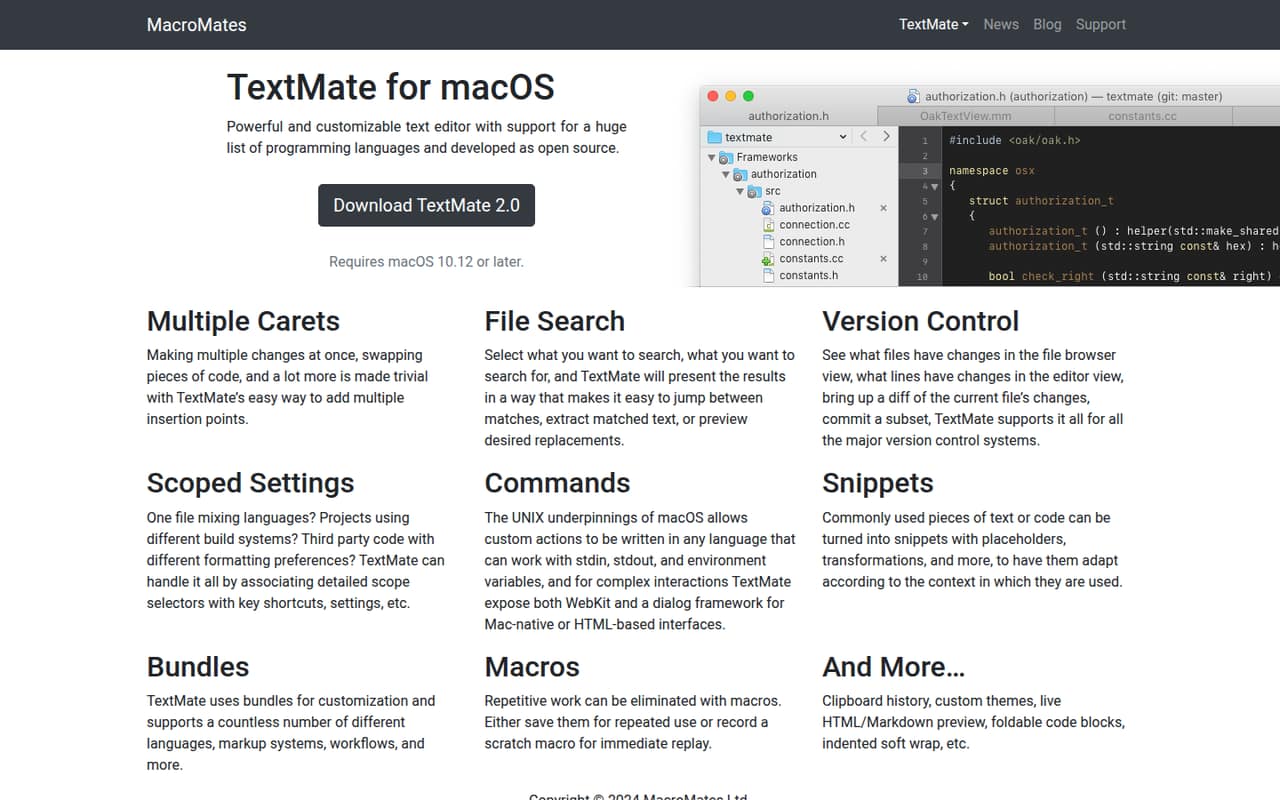
TextMate is a locally installed, open-source text editor for macOS, not a hosted API or full IDE. It combines multi-caret editing, file search, version-control tools, scoped settings and customizable commands, bundles, snippets and macros. The homepage lists macOS 10.12 or later as a requirement.
It costs nothing to use, and its command and bundle system can fit language-specific workflows. But developers report uncertainty about its update pace, and the vendor does not publish a support commitment or production-service guarantees. It suits people who want a lightweight editor they can customize, not teams seeking a managed development platform.
Good fit if
- macOS developers who prefer local editors
- People customizing language-specific workflows
- Users who want a free editor
Skip it if
- Developers who need Windows or Linux
- Teams requiring a support commitment
- Users seeking a full IDE platform
ScoresHow it rates
What works
- Free and open source
- Multiple carets support simultaneous edits
- Search can preview replacements and extract matches
- Version-control tools include diffs and partial commits
- Commands, bundles, snippets and macros are customizable
What doesn't
- Requires macOS 10.12 or later
- No published API, SDK or CLI
- Specific open-source licence is not published
- No published support or reliability commitment
- Reddit users question how actively it is updated
01What TextMate is, technically
TextMate is a locally installed desktop text editor for macOS, not a hosted API, SaaS service, library or self-hosted server. It sits at the editing layer of a developer’s stack: open project files, make changes, search across text, and use built-in version-control tools without routing work through a cloud service. The homepage lists macOS 10.12 or later as the minimum requirement.
Its feature set targets code and text workflows rather than a full IDE. Multiple carets let you edit at several insertion points; search can extract matched text and preview replacements; version-control views show file and line changes, diffs and selected commits. Scoped settings apply shortcuts and preferences according to selectors such as language or build system. Bundles, commands, snippets and macros provide ways to tailor repetitive work. The vendor describes support for many programming languages, markup systems and workflows.
02TextMate API, SDKs and docs
TextMate is an editor to customize, not a service to call: the vendor documents no REST API, webhooks, SDKs or command-line interface. Its extension surface is commands and bundles. The homepage says custom actions can be written in any language that works with stdin, stdout and environment variables. For more complex interactions, commands can use WebKit or TextMate’s dialog framework for Mac-native or HTML-based interfaces.
Bundles provide support for languages, markup systems and workflows. Snippets can include placeholders and transformations, while macros record or replay editing actions. Scoped settings associate shortcuts and preferences with selectors such as language or build system. The site links to documentation for versions 2.0 and 1.x. Developers building custom bundles should consult those docs for the relevant format and compatibility details. Since TextMate is not an API product, confirm any third-party SDK or integration requirements against the vendor’s documentation before adopting it in a larger toolchain.
03TextMate pricing for developers
TextMate is free and open source. The pricing information lists no monthly or annual price, and the official purchase page says license keys are not available for sale. There is no published usage allowance, request quota, seat charge, compute meter or paid add-on to budget for. Because TextMate is a local editor rather than a hosted service, there is no usage-based bill that grows with requests or traffic.
That makes the direct cost straightforward for an individual or team: the editor is available without a stated purchase price. The vendor does not publish a paid tier, free-trial terms, or a pricing schedule for commercial use. The specific open-source licence is not stated on the homepage, so organizations with licence-review requirements should check the project’s source and documentation before distributing or modifying it. Budget separately for the time needed to maintain custom bundles and workflows; the vendor publishes no support or maintenance plan in the pricing information.
04TextMate: open source, self-hosting and lock-in
The vendor describes TextMate as open source, but the homepage does not name its licence. Check the project’s source and licence terms before including modified versions in a product or redistributing the editor. TextMate is installed and used as a macOS application; self-hosting is not relevant in the way it is for a server or hosted API.
There is no hosted TextMate account or service from which to export project data. Your work remains in the files you edit locally, so moving to another editor does not require exporting data from a vendor platform. Custom commands, bundles, settings and snippets may take more effort to reproduce elsewhere; their portability depends on how they are built. The editor itself does not impose a service API that ties application code to a provider.
05TextMate in production
TextMate is a local editor, so hosted-service concerns such as API rate limits, request scaling and service uptime are not the main production risks. The homepage lists macOS 10.12 or later, but does not give a support SLA, security or compliance commitments, or a release schedule. Teams standardizing on it should verify current macOS compatibility and decide who will maintain custom bundles and commands.
Developer comments on Reddit are mixed on maintenance: some describe TextMate as working well, while others say they are unsure when it was last updated or call it stagnant. One commenter says the project still gets updates, while another reports using TextMate 2 daily. Those are individual reports, not a vendor support commitment. For a team workflow, test the required bundles and version-control operations on the macOS versions you support, and keep project files and customizations in a form your team can maintain independently.
From the threadsWhat users say
Reddit sentiment is mixed: some users keep TextMate in daily use and say it still works, while others question its update pace or have moved on. The discussion points to a tool that retains loyal users but may not meet everyone’s expectations for ongoing development.
Textmate works
I still use TextMate 2 every day
I’m unclear when it was last updated
Pretty much stagnant but certainly if you liked it then it still works
Questions people ask
Is TextMate free?
Yes. TextMate is described as free and open source, and its purchase page says license keys are not available for sale. The pricing information lists no monthly or annual price, usage allowance, paid add-on or free-trial terms. Check the project’s licence before redistributing or modifying it.
What operating system does TextMate support?
TextMate is for macOS, and the homepage lists macOS 10.12 or later as the requirement. It is not presented as a Windows or Linux editor. Check the vendor’s current documentation for compatibility details before deploying it across a mixed-version Mac fleet.
Which programming languages work with TextMate?
The vendor describes support for a large list of programming languages, along with markup systems and workflows. TextMate uses bundles for customization, and the homepage does not list individual language coverage. Check its bundle documentation and available bundles for the languages your team uses.
Does TextMate support version control?
Yes. TextMate can show changed files in the file browser and changed lines in the editor, open a diff of the current file, and commit a subset of changes. The homepage says it supports major version-control systems but does not name them, so verify support for your specific system.
Can I customize TextMate for my workflow?
Yes. TextMate supports commands, bundles, scoped settings, snippets and macros. Commands can be written in any language that works with stdin, stdout and environment variables; complex interactions can use WebKit or a Mac-native or HTML-based dialog. See the vendor’s documentation for implementation details.