
We may earn a commission if you buy through links on this page. It never changes a score or a ranking. How we make money
The bottom line
A convenient managed home for small Python apps, but not a general-purpose server replacement.
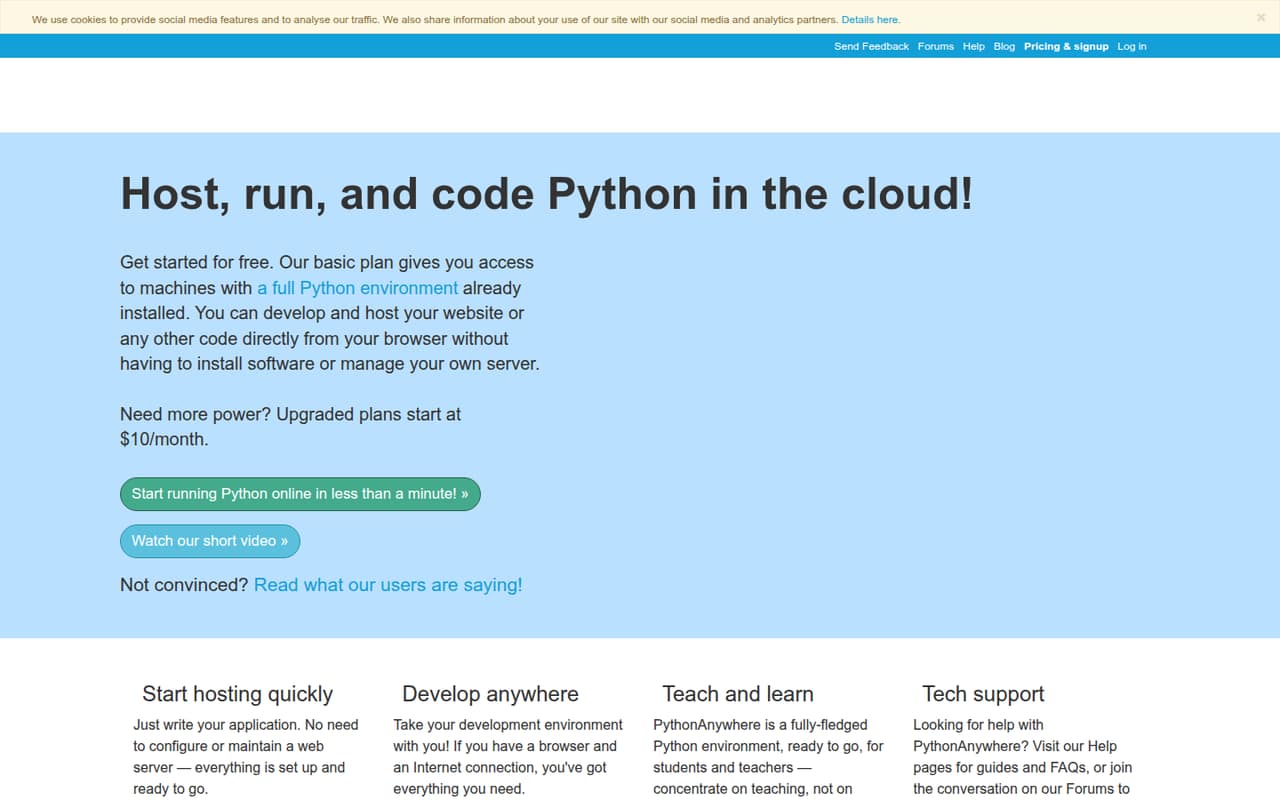
PythonAnywhere is a hosted Python environment: write code in a browser, use cloud consoles and storage, and deploy WSGI web apps without managing a Linux server. It supports Django, Flask, web2py, Bottle and other WSGI frameworks, with scheduled tasks and Git access.
The free Beginner plan is useful for learning and small projects, but its 100 CPU-seconds per day and restricted outbound internet are meaningful constraints. Reddit users also report concerns about uptime, PostgreSQL compatibility and background workloads.
Good fit if
- Python learners and classroom use
- Small Django or Flask sites
- Browser-based Python development
Skip it if
- Apps requiring unrestricted outbound HTTP
- Celery or threading-dependent workloads
- Teams needing full server control
ScoresHow it rates
What works
- Code and run Python from a browser
- Managed hosting for common WSGI frameworks
- Free Beginner plan for small projects
- Scheduled tasks included on paid plans
- Git, Mercurial and Subversion project access
What doesn't
- Free plan restricts outbound internet
- Beginner plan allows 100 CPU-seconds daily
- No self-hosting path is presented
- Reddit users report uptime concerns
- PostgreSQL and background-work limits may block app designs
01What PythonAnywhere is, technically
PythonAnywhere is a hosted Python development environment and web-hosting service, not a Python package, local IDE or server you install in your own infrastructure. Its browser interface provides a code editor, Python consoles, server-side storage and tools for deploying web applications. The vendor says you can develop and host code without installing software or managing your own server.
For a web stack, PythonAnywhere sits between your application and the underlying machines: you supply a Python WSGI app, and the service handles the hosting environment. Quickstart installers cover Django, web2py, Flask and Bottle; the vendor says it can also host other WSGI frameworks. Scheduled tasks and browser-accessible consoles cover scripts and interactive work alongside web traffic.
That managed model reduces server setup and patching work, but it also means your app depends on PythonAnywhere’s environment, account limits and supported services. It is a fit for small sites, prototypes, coursework and simple scripts—not a drop-in replacement for unrestricted Linux infrastructure.
02PythonAnywhere API, SDKs and docs
The main integration surface is the hosted browser environment: write Python in the web editor, open browser-based consoles, upload or download files, and deploy a WSGI web app. The vendor lists quickstart installers for Django, web2py, Flask and Bottle, plus support for other WSGI frameworks. It also lists Git, Mercurial and Subversion project access, scheduled tasks, and preconfigured Python versions and libraries.
The vendor doesn't publish a public REST API or SDK list on its homepage. It presents PythonAnywhere as a browser-based service rather than an API-first platform, so teams automating deployment or account operations should check the current documentation for supported interfaces and confirm SDK support before building a workflow around them. The homepage points users to Help pages, guides, FAQs and forums; it does not name a CLI or a specific language SDK.
For teaching, teachers can view student files and consoles and distribute files. That makes the service usable as a shared learning environment, but it is not a general deployment pipeline or infrastructure-as-code interface.
03PythonAnywhere pricing for developers
Beginner is free and includes one web app, up to two consoles, 100 CPU-seconds per day, 512MB of private storage and restricted outbound internet. That is enough to learn or host a small project if its scripts stay within the daily CPU allowance and it does not need unrestricted external requests.
Developer costs $10 per month, or $8.33 per month with annual billing. It includes one web app, three web workers, 5,000 CPU-seconds per day, 5GB of private storage and 20 scheduled tasks. Custom is listed at $10–$500 per month, with up to 20 web apps, up to 100,000 CPU-seconds per day, configurable workers and disk, and a choice of always-on tasks. Paid plans have a one-month minimum and can be canceled anytime; annual subscriptions pay for 10 months per year.
Additional CPU seconds are available, but the price is not published. Optional private PostgreSQL and storage costs vary by configuration. The pricing page does not publish a free trial.
04PythonAnywhere: open source, self-hosting and lock-in
PythonAnywhere is presented as a hosted service, not as a server users can install in their own cloud or data center. The vendor doesn't publish an open-source license or a self-hosting option, so treat the platform as proprietary and hosted-only unless the vendor confirms otherwise.
You can access files and work with Git, Mercurial or Subversion projects, which gives you ways to keep application code in a repository and move files. That is not the same as a complete account export: plan settings, scheduled tasks, web-worker configuration and any managed database need to be recreated or moved separately. The vendor doesn't publish a one-click migration or complete data-export process.
A typical WSGI app can be moved to another Python host, but expect to review Python versions, installed packages, environment settings, database compatibility, filesystem paths and task scheduling. Keeping the app and its deployment notes in version control reduces the work if you need to leave.
05PythonAnywhere in production
The production fit depends on workload shape. The Developer plan lists 5,000 CPU-seconds per day, three web workers and 20 scheduled tasks; Custom offers configurable capacity up to 100,000 CPU-seconds per day. The vendor says a $10 Developer account can support a 10,000-hit-per-day website, but that is a vendor claim, not a capacity guarantee for every app. Check CPU use, worker needs, storage and outbound access against your own traffic and dependencies.
Outbound internet restrictions are especially important: the free plan explicitly restricts it, and one Reddit thread reports that the restriction prevented calls to an external embeddings API. Another Flask discussion reports trouble using pgvector with PythonAnywhere’s PostgreSQL version and says threading and Celery were not supported for that user’s workload. These are developer reports, not universal compatibility statements.
A Django Reddit thread reports recurring outages; treat that as a reason to verify current status history and support expectations, not as an uptime measurement. Ask the vendor about backups, incident response, security controls and compliance needs before hosting critical or regulated data.
From the threadsWhat users say
Developer reactions are mixed. Users praise the low-effort route from Python code to a running web app, while other discussions raise concerns about outages, outbound networking and workload compatibility.
easiest way to get a Python webapp running without all the fuss of a VPS
PythonAnywhere free-tier outbound limits are brutal
Really had enough of PA servers being down like every other day, and their same excuse for past 2 years
Also, there is no support for threading or Celery
Questions people ask
Is PythonAnywhere free?
Yes. Its free Beginner plan includes one web app, up to two consoles, 100 CPU-seconds per day, 512MB of private storage and restricted outbound internet. That is suited to learning and small projects, but the CPU and network limits can rule it out for apps that make external API calls or run heavier workloads.
Can I host a Flask or Django app on PythonAnywhere?
Yes. PythonAnywhere lists quickstart installers for Flask and Django, as well as web2py and Bottle. It also says it can host other WSGI frameworks. Your account’s worker, CPU, storage and network limits still apply, so check those against the app’s dependencies and expected load.
Can a PythonAnywhere app make outbound HTTP requests?
The free Beginner plan has restricted outbound internet. A Reddit user reports that this blocked calls to an external embeddings API. Check the current outbound-network rules for the plan you intend to use, especially if your app depends on third-party APIs or remote services.
Does PythonAnywhere support Celery or background jobs?
PythonAnywhere provides scheduled tasks, but scheduled scripts are not the same as a continuously running job queue. A Reddit user reports that threading and Celery were unsupported for their workload. Confirm current background-process support with the vendor before designing an app around workers.
Can I move my PythonAnywhere app elsewhere?
You can work with Git, Mercurial or Subversion projects and access your files, which helps move application code. Expect to recreate service-specific settings, scheduled tasks, worker configuration and database setup at the next host. The vendor doesn't publish a one-click account migration process.