
We may earn a commission if you buy through links on this page. It never changes a score or a ranking. How we make money
The bottom line
Review code, documents and images in one system, with on-prem, air-gapped and hosted deployment options.
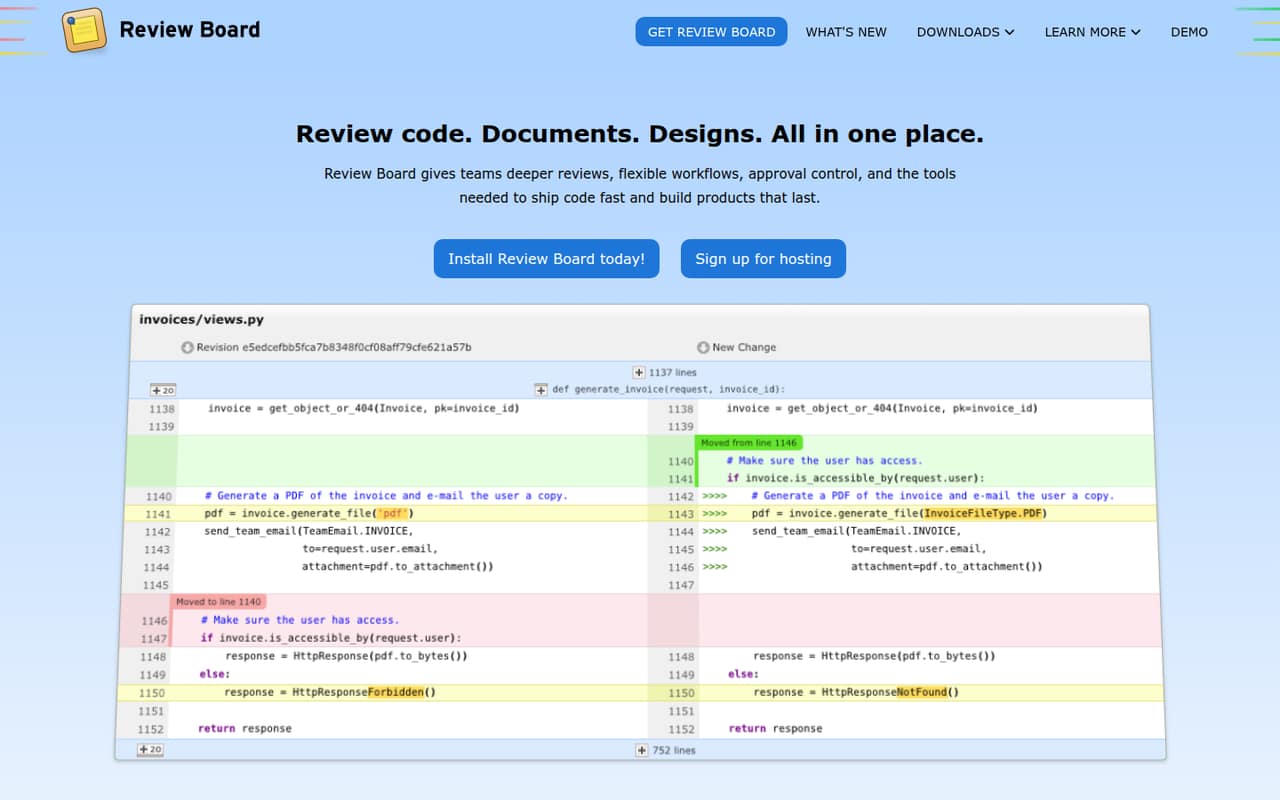
Review Board is a review server for code, documents, designs and images. It combines threaded discussions, issue tracking, approvals and a project dashboard, and can run on-prem or air-gapped, or through RBCommons hosted plans.
The free on-prem plan makes it possible to start without a per-seat fee; paid on-prem plans start at $12/user/month billed annually. Hosted plans start at $6/user/month and include a 30-day trial. Seat limits, usage limits and the licence terms need confirmation before production adoption.
Good fit if
- Teams reviewing code and documents together
- Organizations requiring on-prem or air-gapped hosting
- Projects using supported version-control integrations
Skip it if
- Teams requiring documented SDK support
- Buyers needing published seat and usage limits
- Organizations requiring confirmed licence terms
ScoresHow it rates
What works
- Reviews code, documents, designs and images
- Supports on-prem and air-gapped deployment
- Free Community on-prem plan
- CLI supports posting and landing changes
- Integrations span version control, CI and collaboration
What doesn't
- Seat and usage limits are not published
- SDK and API details need confirmation
- Hosted annual billing is not published
- Licence terms are not published on the homepage
- Data export and migration details need confirmation
01What Review Board is, technically
Review Board is a review server: teams deploy it on-prem or air-gapped, or use hosted RBCommons SaaS. Installers and Docker containers are available for self-managed installations. It sits alongside source control and project collaboration tools, rather than replacing them. Developers submit code changes for comment and approval; teams can also review documents, designs and images in the same workflow.
Reviews include discussions, issues that can be opened and resolved, approval states and a dashboard for incoming and outgoing requests. Image review supports split, color, onion-skin and side-by-side diffs. The product also tracks document changes across revisions. On the homepage, Review Board describes integrations with version-control systems, CI services, authentication providers and collaboration tools. That positions it as a shared review layer across engineering and content work, with hosting choice as a deployment decision. The homepage does not present it as a library or hosted API.
02Review Board API, SDKs and docs
The homepage highlights a command-line workflow through rbt: rbt post HEAD uploads commits and creates a review request, while rbt land --push my-feature lands a branch and pushes it upstream. It also shows a .reviewboardrc configuration file and commands for checking review status and creating aliases. This gives teams a CLI integration surface for review workflows.
The homepage lists integrations with Git, Mercurial, Perforce, Subversion, ClearCase, Azure DevOps Server / TFVC and Jujutsu, as well as GitHub, GitLab, Bitbucket and other hosting services. CI integrations include CircleCI, GitLab CI, Jenkins and Travis CI. Collaboration options include Slack, Microsoft Teams, Jira, Matrix and others; authentication options include Auth0, Microsoft Entra ID and single sign-on. The homepage does not describe an API style or name SDK languages. Confirm API and SDK support in the vendor's documentation before building a custom integration. The homepage links to further integration details.
03Review Board pricing for developers
The pricing page lists Community (On-prem) at $0 per month. Its seat limit and usage limits are not published, so confirm capacity and support terms before treating it as a production option. Plus (On-prem) costs $15 per user/month, or $12 per user/month when billed annually. Enterprise (On-prem) costs $18 per user/month, or $15 per user/month annually. Both paid on-prem plans are priced per user.
RBCommons SaaS Basic costs $6 per user/month and includes two integrations; Business costs $12 per user/month and includes 50 integrations. Both hosted plans list a 30-day free trial. Annual billing for RBCommons is not published. The listed starting price is $6 per user/month, while the free on-prem plan has no stated seat or usage ceiling. The pricing material lists no add-ons, overage rates, request charges or compute-based billing. The bill therefore scales by seats on paid plans, but confirm how the vendor counts users and what happens at any plan limit.
04Review Board: open source, self-hosting and lock-in
Review Board supports self-hosting, including on-prem and air-gapped installs, and the homepage says installers and Docker containers are available. That gives organizations control over where the review service runs, instead of requiring RBCommons SaaS. The homepage does not publish the software licence or explain source availability, so confirm both with the vendor before building internal tooling around the server or redistributing it.
The homepage also does not describe a data-export format, a complete backup procedure or a migration path from hosted to self-managed deployment. Before adoption, ask how to export repositories, reviews, comments, attachments, users and configuration, and whether those exports can be imported elsewhere. Version-control integrations may reduce dependence on a particular repository host, but review history and workflow data can still create migration work. Treat export and restore procedures as procurement questions, not assumed capabilities.
05Review Board in production
Review Board's on-prem and air-gapped options can fit environments that cannot send review content to a multi-tenant hosted service. The homepage also offers managed infrastructure, but gives no security or compliance details there. Confirm the controls relevant to your deployment, including authentication configuration, access boundaries, backups, updates and incident handling.
The pricing material does not publish seat or usage limits for the on-prem plans, and it gives no hosted capacity, rate-limit or overage figures. Ask the vendor about maximum users, repository and attachment sizes, retention, service availability and support response times before relying on it for a high-volume review queue. The homepage lists installers and Docker containers, but operational responsibility for a self-managed deployment still needs to be assigned. For hosted use, verify data export and recovery procedures. The review dashboard and issue states support team workflows, but production readiness depends on limits and operational terms that are not listed in the pricing material.
Questions people ask
What is Review Board?
Review Board is a code, document, design and image review server. Teams can deploy it on-prem or air-gapped, or use RBCommons hosted plans. It supports review discussions, issue tracking, approvals and a dashboard for incoming and outgoing requests.
Can Review Board run on-prem or air-gapped?
Yes. The homepage describes on-prem and air-gapped installations, with installers and Docker containers for setup. It also offers cloud hosting and managed infrastructure. Confirm the support, security and operational terms for the deployment option you plan to use.
How much does Review Board cost?
The Community on-prem plan is listed at $0 per month. Paid on-prem plans start at $12 per user/month with annual billing. RBCommons hosted plans start at $6 per user/month, and both list a 30-day free trial. Hosted annual billing is not published.
What version-control systems does Review Board integrate with?
The homepage lists Git, Mercurial, Perforce, Subversion, ClearCase, Azure DevOps Server / TFVC, Jujutsu and Keysight SOS. It also lists hosting services including GitHub, GitLab, Bitbucket, Gerrit, Forgejo and AWS CodeCommit. Check the vendor's integration details for your specific setup.
Does Review Board provide an API or SDK?
The homepage highlights the rbt command-line tool for posting changes, landing changes and checking review status. It does not name an API style or SDK languages. If you need a custom integration, confirm supported API endpoints and SDK options in the vendor's documentation.