
We may earn a commission if you buy through links on this page. It never changes a score or a ranking. How we make money
The bottom line
A customizable CMS with straightforward licensing, but limited published integration detail on its homepage.
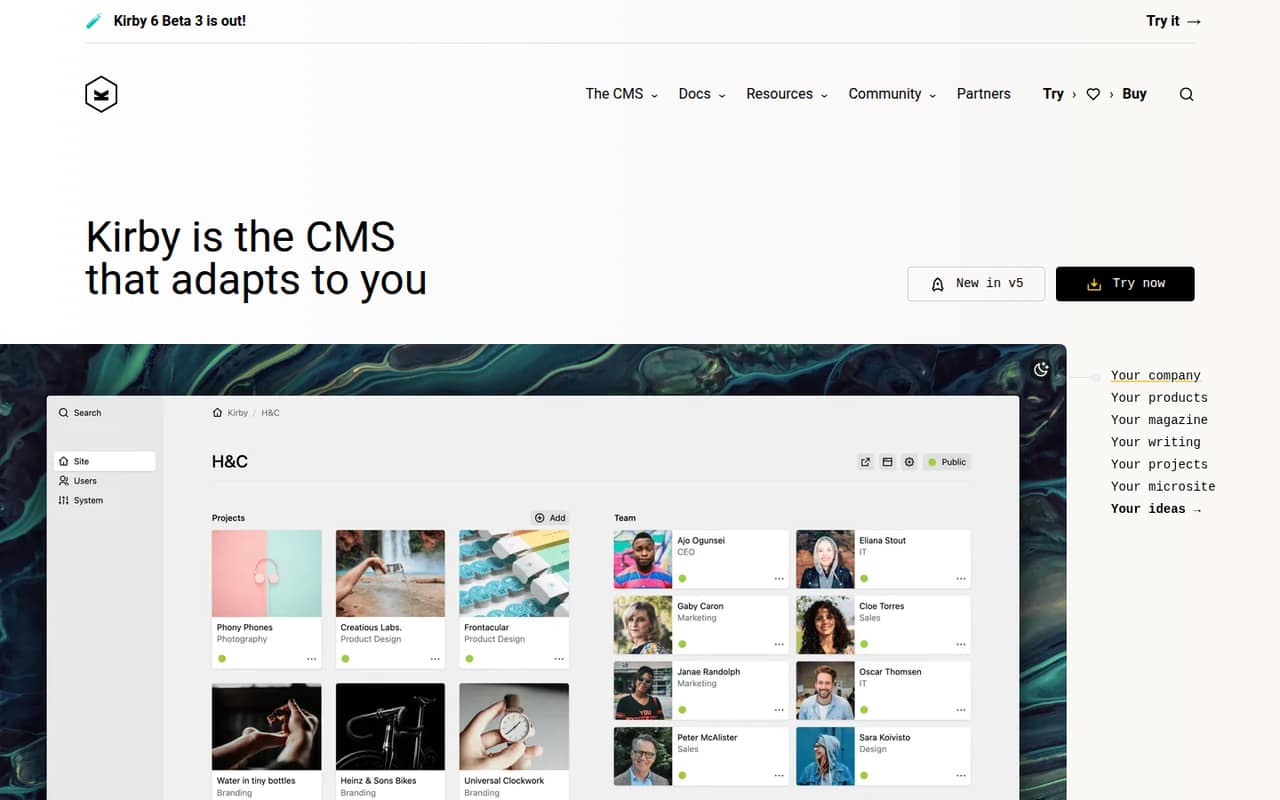
Kirby is a CMS for websites and digital projects. Its homepage shows content organized into projects, team members, clients and pages, with PHP 8 and Vue.js in the example stack. Customers praise the Panel’s simplicity and the ability to customize Kirby for client needs.
Kirby charges a one-time fee per site: $115 for Kirby Basic or $399 for Kirby Enterprise. The homepage does not establish the API, SDK or deployment details developers need to assess integration effort, so confirm those in Kirby’s documentation before committing.
Good fit if
- Custom website projects
- Client sites with tailored content
- Teams that prefer one-time licenses
Skip it if
- Teams requiring a documented API contract
- Projects needing published scale limits
- Buyers who require a free production tier
ScoresHow it rates
What works
- Content examples cover projects, team members and clients
- Customers praise the Panel’s simplicity
- Customers cite customization for client needs
- One-time per-site license pricing
- Kirby Enterprise has no revenue limit
What doesn't
- No free production plan
- Homepage does not publish API or SDK details
- Seat limits are not published
- Hosting and deployment requirements need confirmation
- Production reliability and scale limits need confirmation
01What Kirby is, technically
Kirby is a CMS for websites and digital projects. In a web stack, it sits in the content-management layer: a team structures and edits site content, then uses that content in a website. The homepage example organizes data into projects, team members, clients and site pages, and shows a Panel for editing. Customers describe that Panel as simple and say Kirby can be customized to client needs.
The homepage lists PHP 8 and Vue.js alongside its example, but that does not establish a hosted API, an SDK, or a required frontend architecture. Treat Kirby as a CMS to evaluate for a particular site, rather than assuming it is a hosted headless service or a complete website platform. The vendor’s homepage presents separate information paths for developers, designers, creators and clients. Before choosing it, confirm how content reaches your frontend, where the CMS runs, and what deployment model your project requires.
02Kirby API, SDKs and docs
Kirby’s homepage names PHP 8 and Vue.js in its example, and shows structured content for projects, a team, clients and site pages. That is useful context for the kind of content a site might manage, but it does not establish that Vue.js is a required frontend or that Kirby provides a Vue SDK.
The vendor does not publish API, SDK, CLI, webhook or plugin details on its homepage. It also does not describe an integration protocol there. We would check Kirby’s developer documentation for the content access method, supported languages and SDKs, extension points, and any API authentication or versioning rules before estimating integration work. Confirm how local development, deployment and content migration work as well. The homepage’s customer quotes focus on customization and the Panel, not on API behavior or developer tooling. Do not assume a REST API, webhooks or a particular SDK is available without verifying it in the vendor’s docs.
03Kirby pricing for developers
Kirby has no free production plan. The pricing information lists a free trial with no time limit, but does not state its scope or limits; confirm what it allows before planning an evaluation. Kirby Basic costs $115 one-time per site for organizations under €1 million in annual revenue or funding. Kirby Enterprise costs $399 one-time per site, with no revenue limit. Each plan covers one installation on one domain and includes all features; seat limits are not published.
There is no monthly or annual subscription, and no usage-based charge is listed. The bill grows with the number of licensed sites: the pricing information lists a 5% volume discount for five or more licenses, while costs beyond that are not published. Optional three-year update extensions cost $65 for Basic and $285 for Enterprise, excluding VAT; €59 and €249 are also listed. Confirm applicable taxes and the update-extension terms. For a multi-site deployment, model each site as a separate license rather than assuming a shared installation is covered.
04Kirby: open source, self-hosting and lock-in
The vendor’s homepage does not publish Kirby’s software license, source availability, self-hosting requirements or data-export options. The pricing information describes paid, per-site licenses, but that alone does not establish whether the software is open source or where it can run. Ask Kirby for the applicable license terms and confirm whether your intended deployment is supported before building a production plan around it.
Also verify how content is stored and exported, whether files and structured content can be moved in bulk, and what remains usable if you stop renewing updates. Those details determine how much of a migration is data transfer versus rebuilding templates and integrations. The homepage positions Kirby as customizable, which may help tailor a site but can also make a future move depend on project-specific code. Get export and migration answers in writing for any site where portability is a requirement.
05Kirby in production
The pricing information gives a clear license unit—one installation on one domain—but does not publish request, traffic, storage, seat or scaling limits. It also does not give uptime commitments, support response times, security certifications or compliance details. Those are production questions to resolve with the vendor, not assumptions to make from the one-time price.
Ask how Kirby is deployed and updated, what PHP versions and infrastructure it requires, and how backups, access control and security fixes are handled. Confirm whether the update extension affects access to updates, and what support is included with each license. For a site with multiple domains, separate environments or several editors, clarify how the license and seats apply. The homepage shows an example using PHP 8 and Vue.js, but does not set production requirements. Validate deployment, recovery and migration procedures before relying on Kirby for a critical site.
Questions people ask
What is Kirby?
Kirby is a CMS for websites and digital projects. Its homepage shows content organized into projects, team members, clients and site pages, along with an editing Panel. Customers say the software can be customized to client needs and praise the Panel’s simplicity.
Does Kirby have an API or SDK?
The vendor’s homepage does not publish API, SDK, CLI, webhook or plugin details. Check Kirby’s developer documentation for supported content access methods, languages, SDKs and extension points before estimating an integration.
How much does a Kirby license cost?
The pricing information lists Kirby Basic at $115 one-time per site for organizations under €1 million in annual revenue or funding. Kirby Enterprise costs $399 one-time per site and has no revenue limit. Both cover one installation on one domain.
Is there a free version of Kirby?
There is no free production plan in the pricing information. It lists a free trial with no time limit, but does not state its scope or limits. Confirm what the trial allows with Kirby before using it to evaluate a project.
Can I use Kirby on multiple sites?
Each listed license covers one installation on one domain. The pricing information lists a 5% volume discount for five or more licenses. Confirm how Kirby counts staging environments, additional domains and other installations before purchasing.