
We may earn a commission if you buy through links on this page. It never changes a score or a ranking. How we make money
The bottom line
Windmill puts code-first automation and self-hosting in reach, with production costs tied to seats and compute.
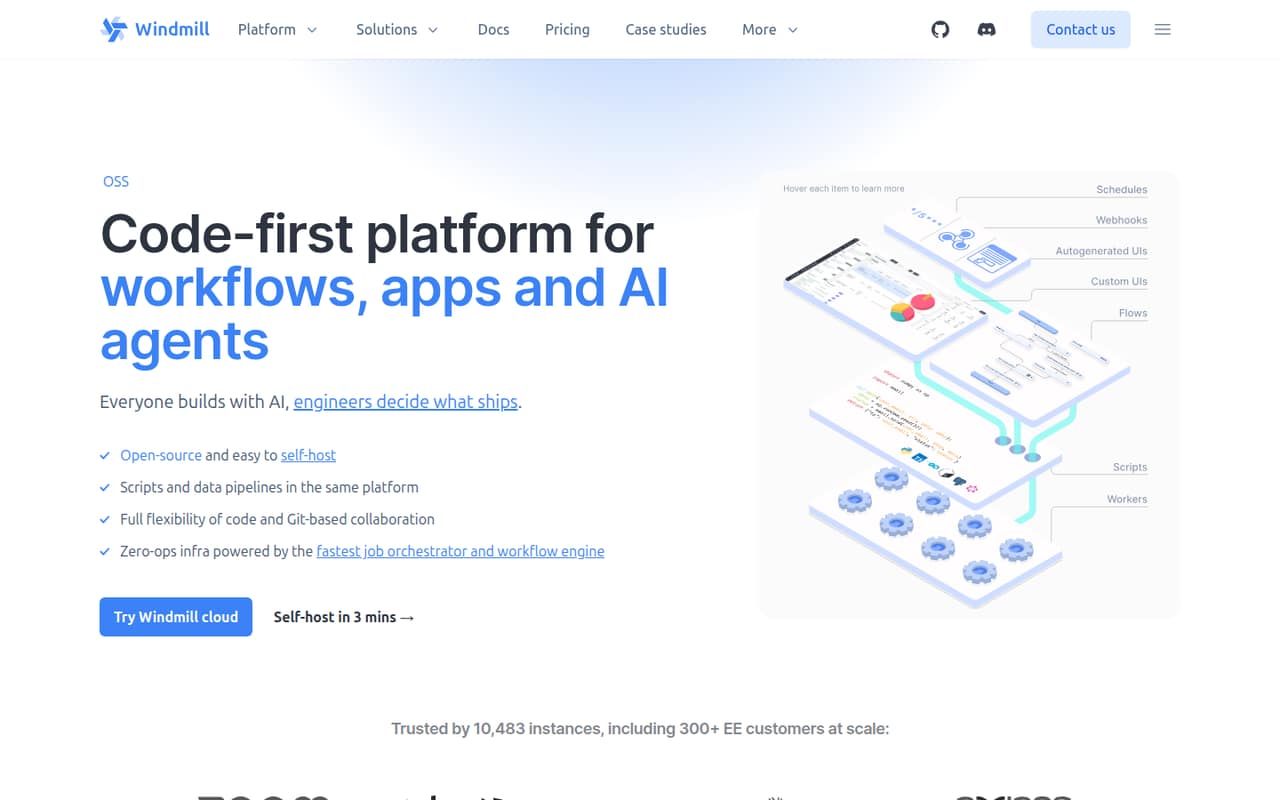
Windmill is an open-source orchestration platform for scripts, DAG workflows, data pipelines, internal apps and AI agents. Build in its UI or locally, then run jobs on Windmill workers in its cloud service or on infrastructure you manage.
The free plan includes unlimited executions, but seats, guest usage, storage and workspace count have stated limits. Enterprise starts at $120 per month, with builders, users and workers adding to the bill. Windmill fits teams comfortable owning code and deployment choices; it is less suited to buyers seeking a simple, fixed-price automation service.
Good fit if
- Teams building internal developer tools
- Engineers who want self-hosted orchestration
- Code-first workflow and data teams
Skip it if
- Teams seeking a no-code-only tool
- Projects needing predictable flat-rate pricing
- Buyers requiring a published SDK matrix
ScoresHow it rates
What works
- Scripts in 20+ languages become API endpoints and forms
- Workflows support retries, approvals and parallel branches
- Self-hosting options include Docker and Kubernetes
- Free plan includes unlimited executions
- Build in the UI or locally with Git-based collaboration
What doesn't
- Enterprise starts at $120 per month
- Builders and workers add recurring costs
- Free plan caps workspaces, users, guests and storage
- Exact open-source licence is not published
- Vendor does not publish rate limits
01What Windmill is, technically
Windmill is an orchestration platform delivered as a hosted service or as software you can self-host. It runs scripts and workflows on workers, and adds a UI for building internal apps, data pipelines and AI agents. It sits between your code and the systems it needs to operate: scripts can call integrations, become API endpoints and run on schedules or webhooks.
The platform addresses a common split in automation stacks: scripts live in repositories, job scheduling sits elsewhere, and internal interfaces require separate development. Windmill brings those pieces into a workspace, with Git-based collaboration for code and deployment workflows. Teams can build in the UI or locally, then run jobs on its orchestration engine. Workers run one script at a time using the CPU and memory available to them. For deployment, the homepage lists Docker and Kubernetes self-hosting, plus worker-group and instance configuration through YAML, the CLI or a Kubernetes operator.
02Windmill API, SDKs and docs
Windmill turns scripts into API endpoints and generated forms. Scripts and flows also get autogenerated webhooks; workflows can be drawn as DAGs or written in Python or TypeScript, then called as API endpoints. The homepage lists REST and GraphQL support. Scripts support 20+ languages, including Python, TypeScript, Go, Rust, PHP, Bash, SQL, C#, Java, Ruby and PowerShell.
For local development, install the CLI with npm install -g windmill-cli; the homepage also lists MCP as a way to work from an editor or coding agent. Apps can use React or Svelte frontends, with scripts and workflows as their backend. Integrations shown include Stripe, Slack, Snowflake and HubSpot. The homepage describes docs but does not name language SDK packages. Confirm SDK support and API authentication details in Windmill’s docs before choosing a client library. Scripts resolve imports, lock versions at deploy and can install from private registries.
03Windmill pricing for developers
The Free and Open-source plan costs $0 per month and includes unlimited executions, three workspaces, up to 50 users, 100 guest app users per 30 days and 10 GiB of workspace object storage. It also includes community support on Discord. Those limits—not execution volume—are the stated boundaries to check for a small deployment.
Enterprise starts at $120 per month and adds audit logs, SAML, group synchronization, uncapped SSO that requires seats, 24/7 priority support with a three-hour response time and a commercial licence. The pricing page lists a one-month trial. Additional charges include $20 per builder per month and $10 per non-builder or external JWT user per month. Workers cost $50 each per month in the simulator; its example prices two standard workers at $100. The simulator also lists eight native subworkers at $50. Guests beyond the first 100 count as one seat per four guests, rounded up. Annual per-month prices are not published, and the simulator’s $170 example depends on its configured seats and compute units.
04Windmill: open source, self-hosting and lock-in
Windmill describes itself as open-source and offers self-hosting with Docker or Kubernetes, including cloud and on-premises deployments. The Enterprise plan includes a commercial licence, but the exact open-source licence is not published on the homepage; confirm its terms before embedding or redistributing Windmill as part of a product.
Git-based collaboration and local development give teams a path to keep scripts and workflows in their own development process. Workspace forks copy scripts, flows, apps, resources and data tables into an isolated workspace on a Git branch. That helps with review and rollback, but it is not a complete export guarantee for every kind of operational data. The vendor does not publish a full data-export path on the homepage. Before adopting Windmill, confirm how to export job history, credentials, execution logs and workspace data, and plan a migration around its workflow definitions and integrations.
05Windmill in production
Windmill’s workers run one script at a time and use the CPU and memory available to them. The homepage lists worker groups, autoscaling and instance settings, configured through YAML with the CLI or a Kubernetes operator. Workflows include retries, approvals and parallel branches. These features provide building blocks for production orchestration, but teams still need to size workers and test failure handling against their own jobs.
The free tier permits unlimited executions, but caps workspaces at three, users at 50, guest app users at 100 per 30 days and object storage at 10 GiB. The vendor does not publish rate limits on the homepage; ask about API, webhook and worker limits before committing a high-volume workload. Enterprise adds audit logs, SAML and group synchronization. Check access controls for integrations, AI tools and MCP servers, and confirm how secrets and logs are handled for your compliance requirements. For self-hosted deployments, your team owns the underlying infrastructure and its availability.
Questions people ask
What is Windmill used for?
Windmill runs scripts, DAG-based workflows, data pipelines, internal apps and AI agents on an orchestration platform. Teams can build in its UI or locally, then run scripts as API endpoints, forms, scheduled jobs or webhooks.
Can I self-host Windmill?
Yes. Windmill lists Docker and Kubernetes deployment for self-hosting in your cloud or on-premises. It also lists worker-group and instance settings managed through YAML, the CLI or a Kubernetes operator.
Is Windmill free for production use?
The Free and Open-source plan costs $0 per month and includes unlimited executions. It is capped at three workspaces, 50 users, 100 guest app users per 30 days and 10 GiB of workspace object storage. Check those limits against your production setup.
Which programming languages does Windmill support?
The homepage says Windmill supports scripts in 20+ languages, including Python, TypeScript, Go, Rust, PHP, Bash, SQL, C#, Java, Ruby and PowerShell. Workflows can also be written in Python or TypeScript.
What should I check before putting Windmill in production?
Confirm worker capacity, API and webhook limits, data export and your required security controls. The free plan has stated workspace, user, guest and storage caps; Enterprise adds audit logs, SAML and group synchronization.